Infinite Expansion · Sales & CRM

See every deal. Know which ones need you today.

Quote it. They sign it. The AI tells you what's next.

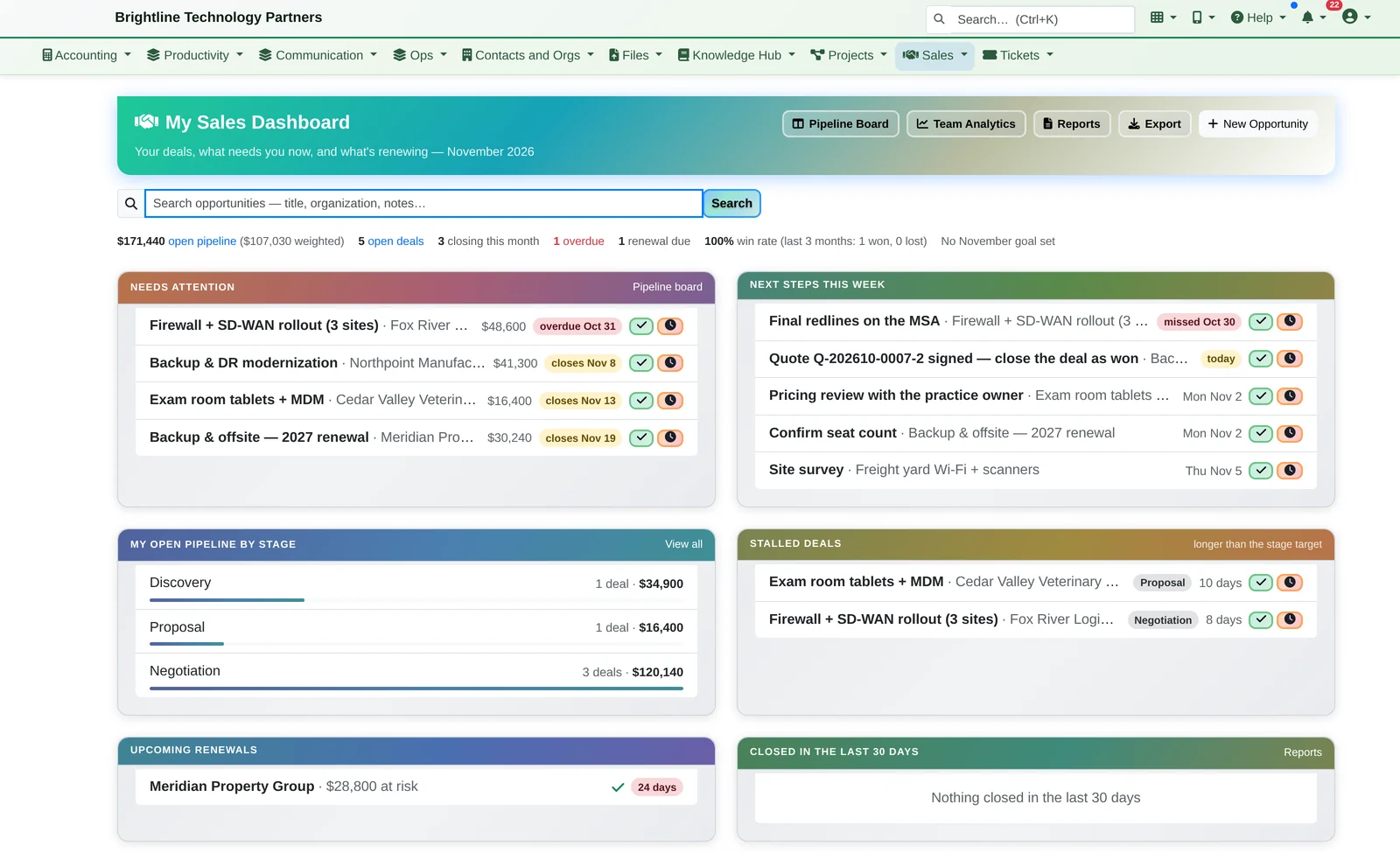
Sales opens on a to-do list, not a wall of charts: the deals past their close date, the next steps due this week, and the deals that have sat in one stage too long. Handle each one right there, turn any deal into a quote the customer signs online, and see the quarter's forecast against your goal.

Sales dashboard with Needs Attention, Next Steps This Week, pipeline by stage, stalled deals and upcoming renewals
Your deals, sorted by what needs you now.

Clients rarely leave because of one bad day. They drift away after months of silence nobody noticed. Infinite Expansion notices for you, and writes the first email.

How It Works

Monday morning to a signed quote.

  1. Monday morning, the Sales dashboard. Four deals need attention, five next steps are due this week, and two deals have stalled. Each row has a check mark to mark the next step done and set the next one, and a clock to push it back.
  2. The Northpoint Manufacturing deal: Backup & DR modernization, $41,300. The line items come from the catalog. New Quote turns them into a numbered quote, and Send for Signature emails the customer a secure link.
  3. Greg signs it online. The quote shows Signed, the deal page shows a green banner, and the next step becomes “close the deal as won”.
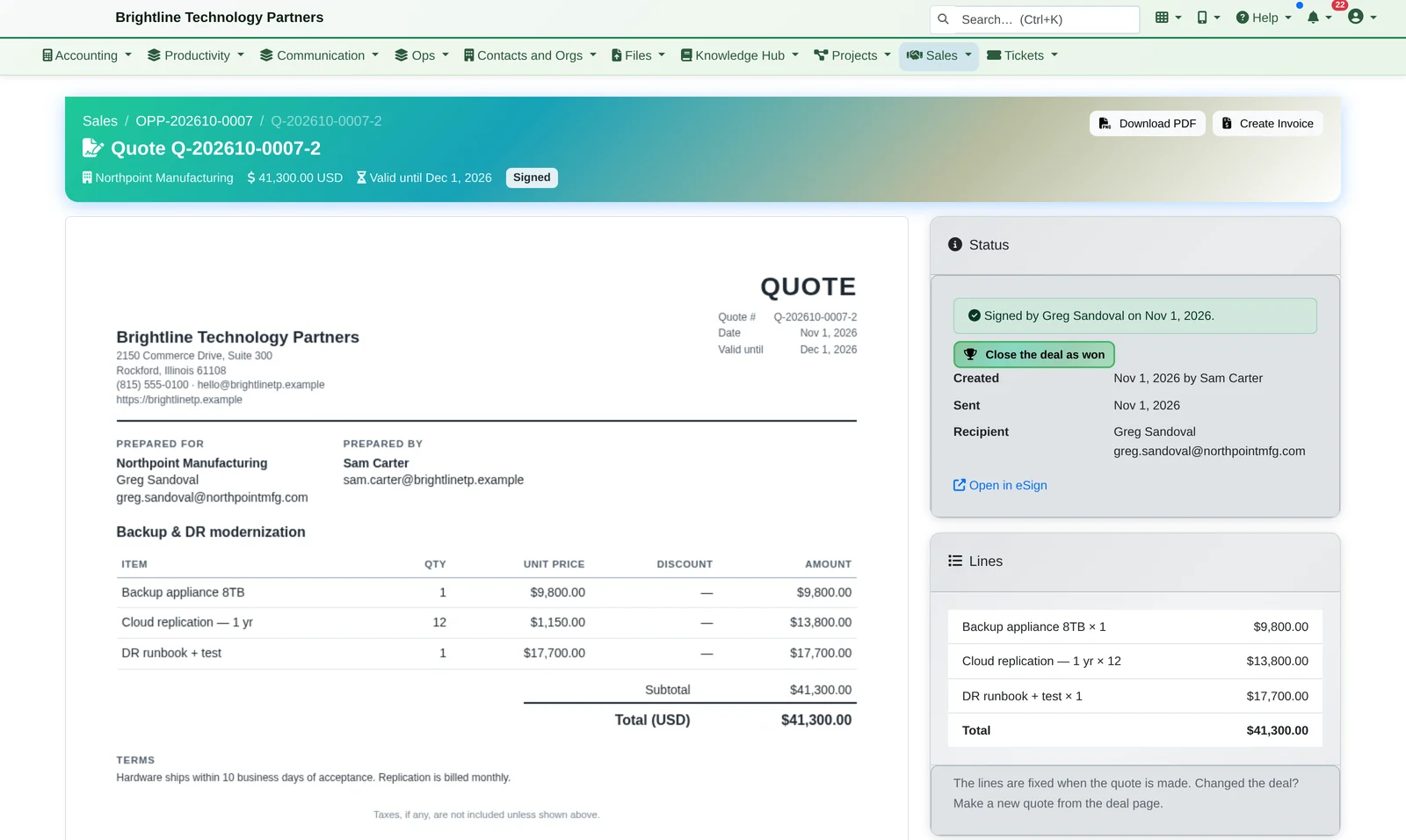
Quote Q-202610-0007-2 for Northpoint Manufacturing, marked Signed, with line items, totals and a Create Invoice button
From deal to signed quote, without leaving the platform.
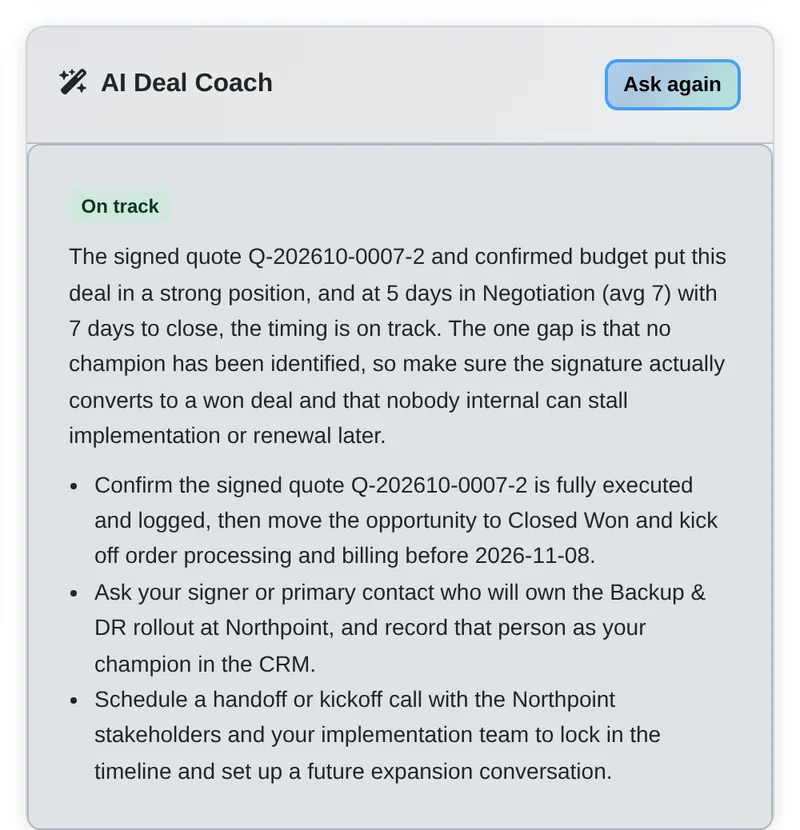
  1. The AI Deal Coach agrees: on track. Confirm the signed quote, move it to Closed Won, and line up the kickoff.
  2. Close Won, then Start Project and Create Invoice. The project and a draft invoice are created from the quote's own lines.
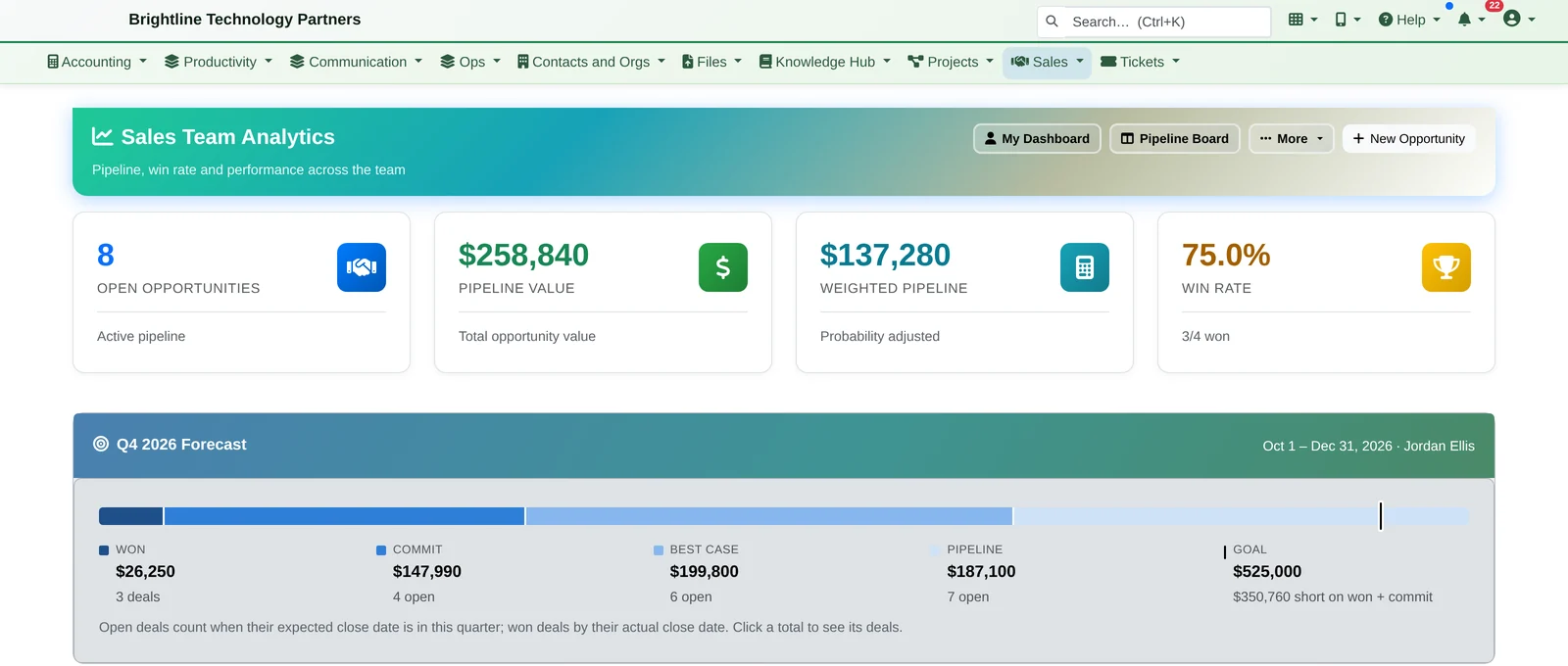
  3. On Friday, the sales manager checks the quarter: won, commit, best case and pipeline against the team goal, and what changed since last week.
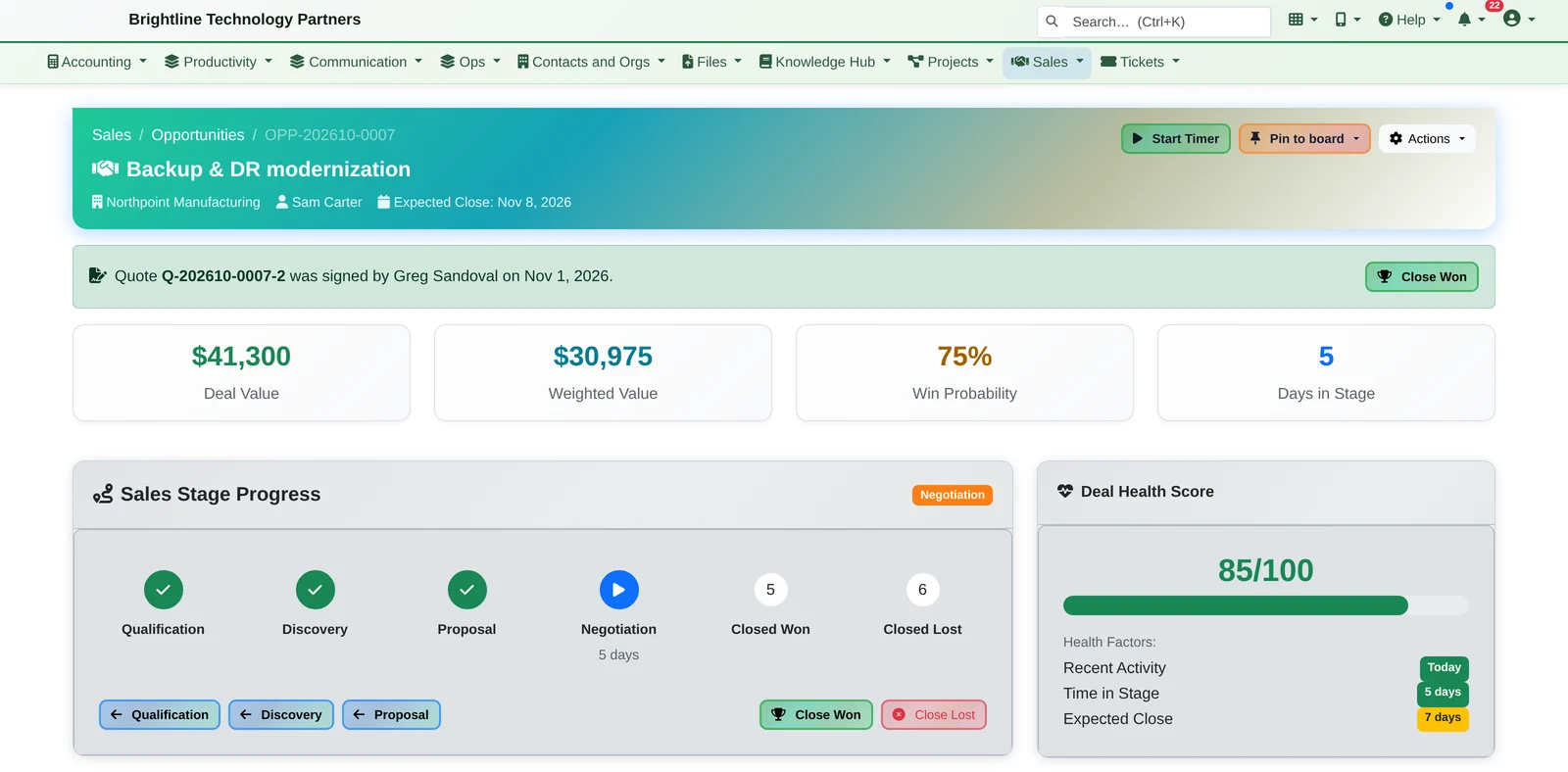
Deal page for Backup and DR modernization with a quote was signed banner, deal value tiles, stage progress and an 85 out of 100 health score
The customer signed the quote. The deal page already knows.

AI Deal Coach

Ask the AI how the deal looks, and what to do next.

  • Click Ask for a short read on the deal (on track, at risk or critical) and two or three suggested next steps
  • It reads the deal's stage, timing, next step and health factors
  • It only runs when someone clicks, and it respects deals and records marked “exclude from AI”

The coach suggests. It never changes the deal.

AI Deal Coach card marked On track with a short assessment and three suggested next steps
A short read on the deal, and what to do next.

Pipeline, Deals & Quotes

A dashboard that tells you what to do next.

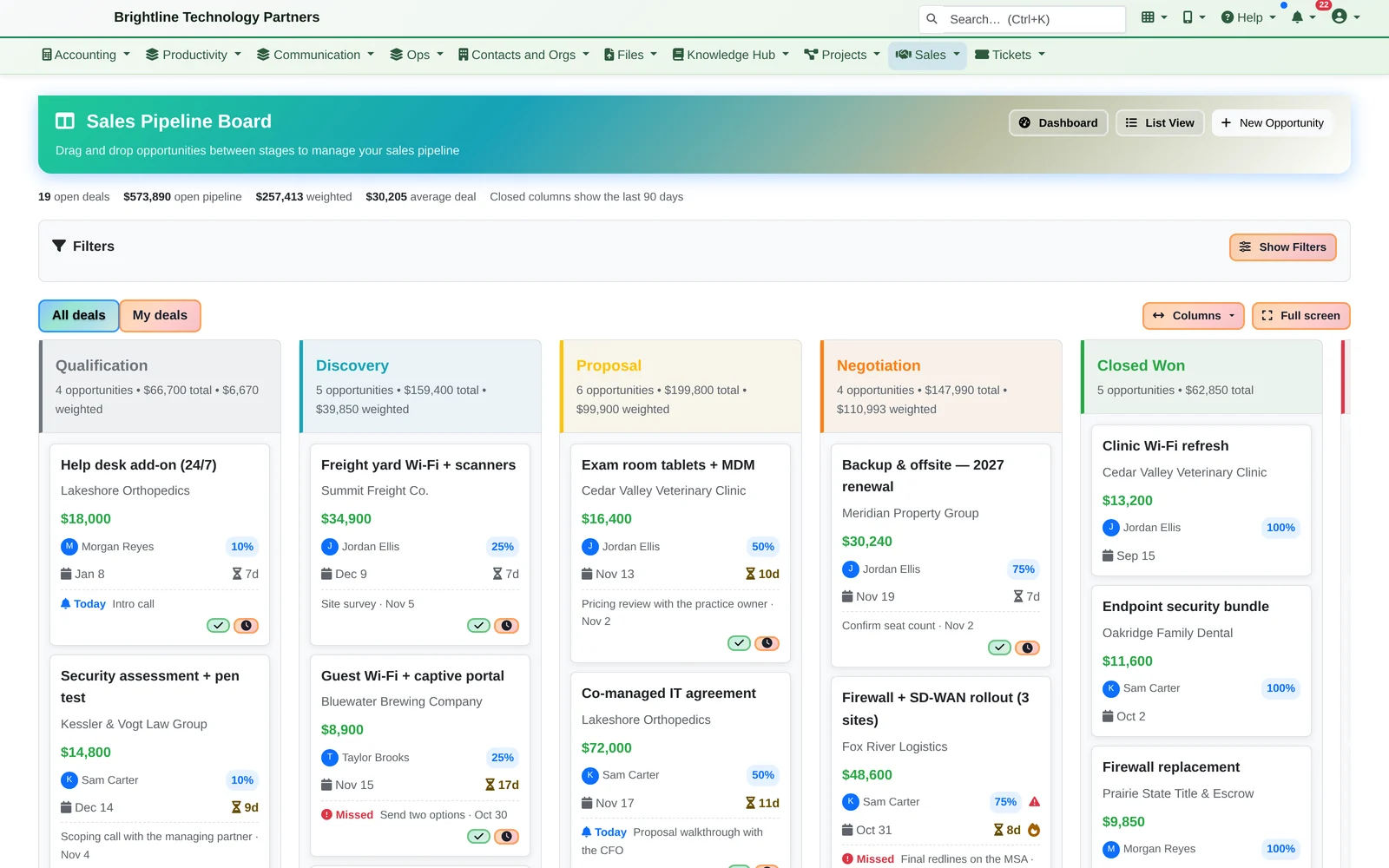
Pipeline board with Qualification, Discovery, Proposal, Negotiation and Closed Won columns of deal cards
Drag deals through your pipeline. Every card shows its next step.
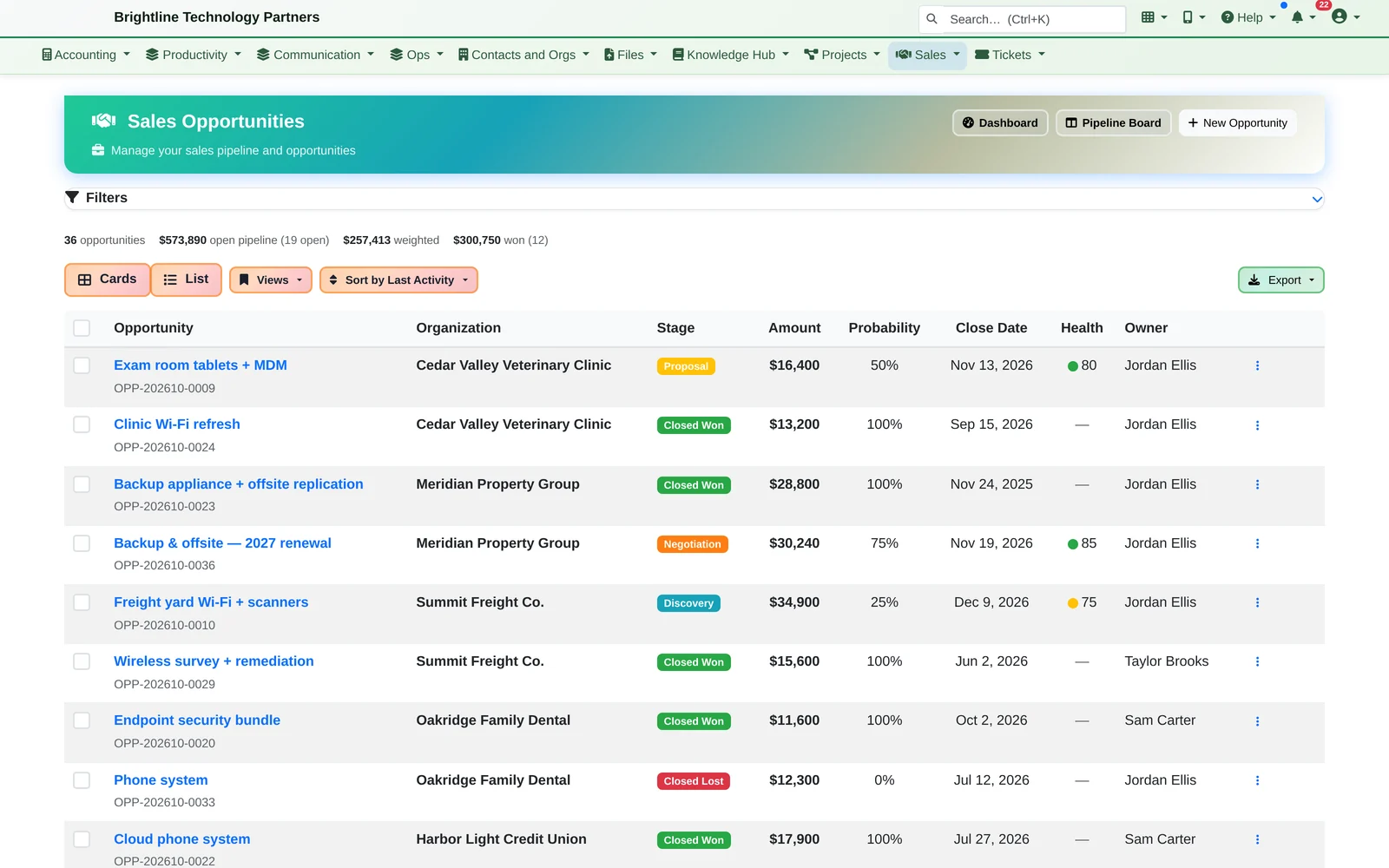
Opportunities list with stage badges, amounts, probabilities, close dates and health scores
Every opportunity with value, stage, probability, close date and health.

Dashboard and pipeline

  • Needs Attention: deals past their close date or closing today
  • Next Steps This Week, with missed ones in red; stalled deals that have been in their stage longer than that stage's target
  • Mark a next step done (log what happened and set the new step) or reschedule it, without leaving the page
  • An 8 AM daily email lists each person's next steps that are due or missed, and their stalled deals
  • Pipeline board with days in stage, full-screen mode, and “My deals / All deals”
  • Opportunities list with search, filters, saved views, bulk update and CSV export
  • Stages can require fields (for example “budget confirmed” before Proposal)

Every deal, quote and win

  • Deal value, weighted value, win probability, days in stage and a health score on one page
  • Line items from the catalog with current prices, plus custom lines; log calls, meetings and emails in the same form as the next step
  • One click turns the deal's lines into a numbered quote, with optional add-on lines and a tax rate
  • Download a PDF with your logo, email it, or send it for signature with the built-in eSignature; the customer signs online and ticks any optional items they want
  • Or send it to the client portal, where the customer reads it and accepts online
  • An accepted quote updates the deal and becomes a draft invoice in accounting for someone to finalize and send
  • A quote with no answer after five days creates a follow-up; renewal deals are created 90 days before a contract ends
  • Start Project creates a project for the client, optionally from a template, with a task per line item

CRM & AI Relationship Alerts

Your CRM should tell you who to call. Ours does, and drafts the email.

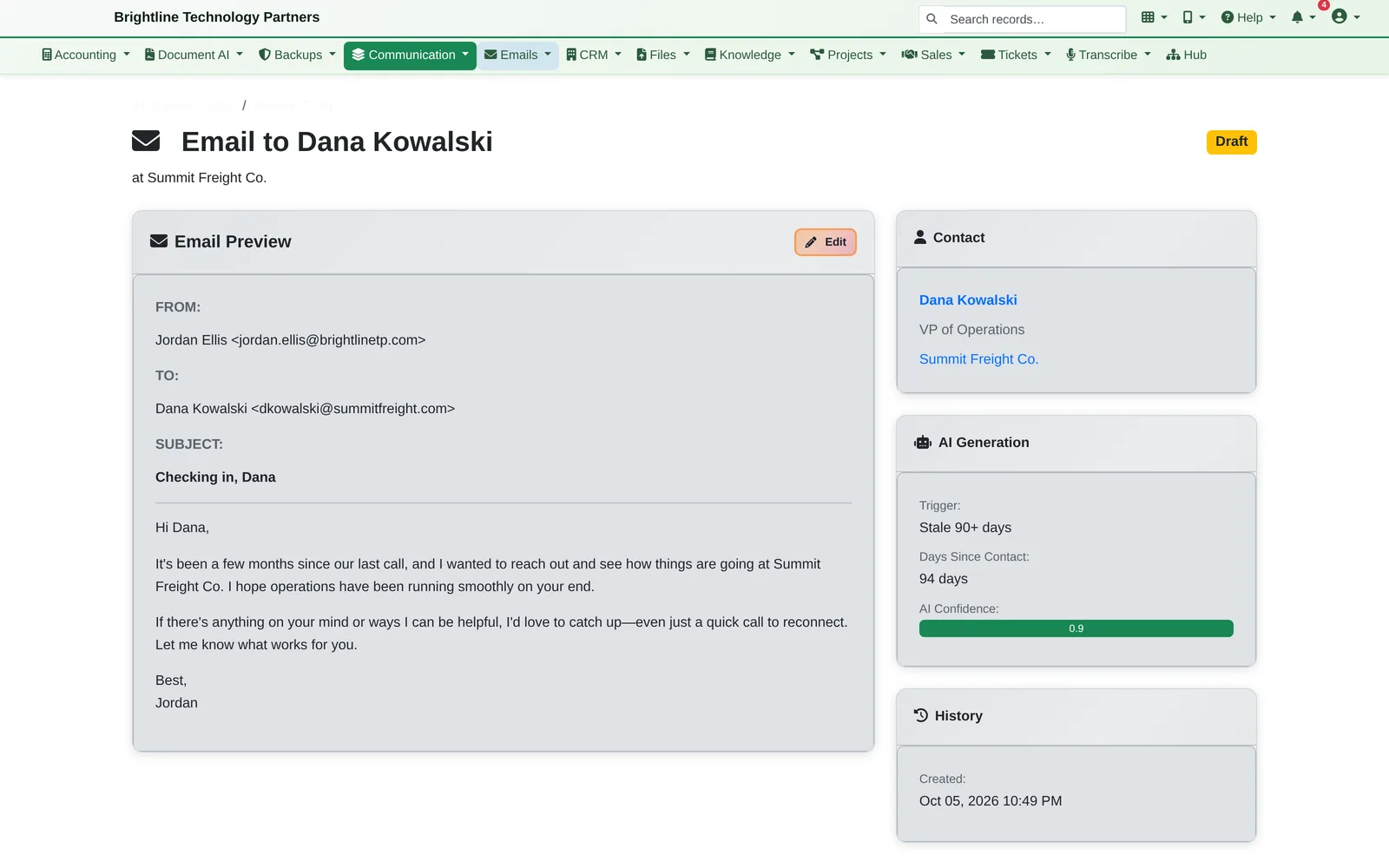
Infinite Expansion watches every account you manage. When a key decision-maker hasn't heard from you in two months, or a deal has gone quiet, you're told. Then the AI writes the check-in email and waits for your OK.

  • It watches decision-makers (contacts flagged as able to sign or approve purchases) at the accounts you manage
  • “Stale” means no calls, meetings, emails, notes or updates in 60+ days, adjustable per organization or contact
  • Also flags deals with no activity in 14+ days, overdue deals, tickets and projects, unbilled time and missing next steps
  • Organizations and contacts can be opted out of alerts or outreach

Nothing goes out without a person approving it.

A drafted check-in email to a client contact, with the AI's reason: 94 days since last contact
Review, edit, approve. The AI explains why it wrote it: 94 days since the last contact.

The CRM Itself

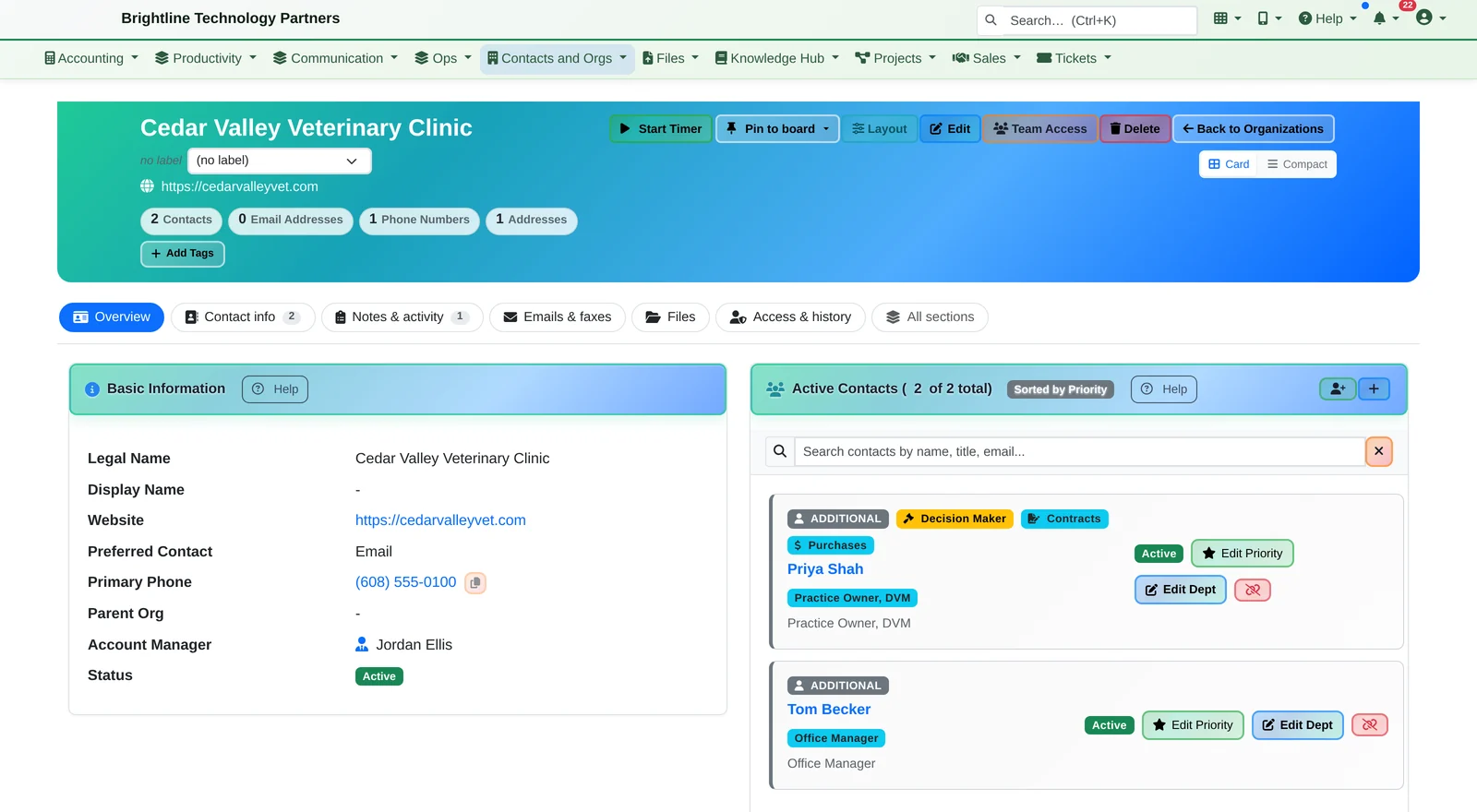
Every client on one page, organized into tabs.

Every client record has Overview, Contact info, Notes & activity, Emails & faxes, Files, and Access & history tabs. The overview shows the essentials, and All sections shows everything on one page.

CRM organization page for Cedar Valley Veterinary Clinic with tabs, basic information and active contacts with Decision Maker and Contracts badges
Every client on one page, organized into tabs.
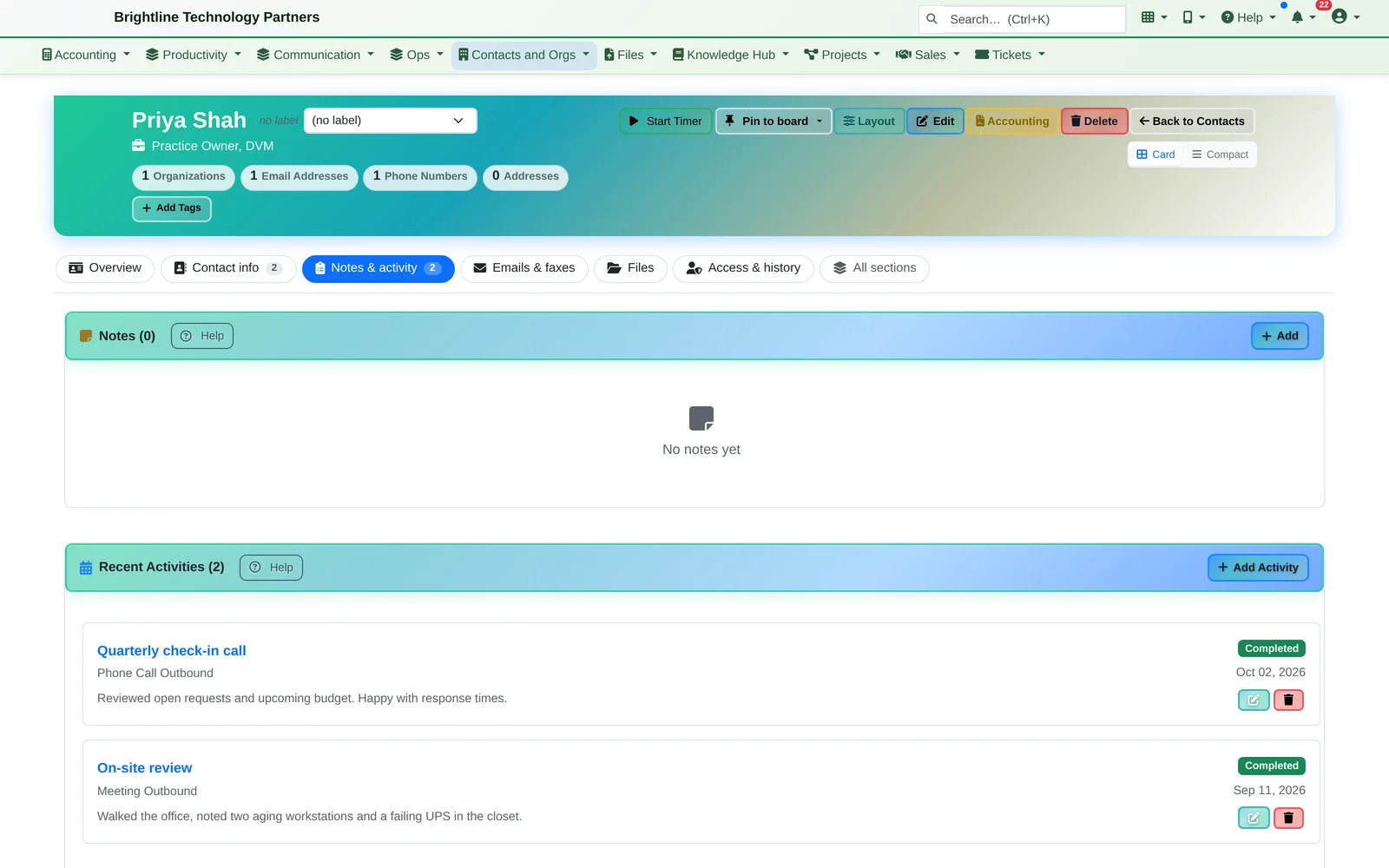
Contact page for Priya Shah on the Notes and activity tab, listing a quarterly check-in call and an on-site review
Every call and meeting with the person, in one tab.
  • Organizations and contacts with multiple emails, phones and addresses, decision-maker / contract-signer / purchase-approver flags, departments, branch hierarchies and custom fields
  • Every email, call, meeting, note, ticket, project, opportunity, invoice and file linked to the client automatically
  • Tags, saved searches, duplicate detection and merge, and CSV export
  • Record-level access control, so teams see only the accounts they should; one search box for the whole platform; works on the phone

Goals & Forecast

The quarter at a glance.

  • Monthly, quarterly and yearly goals per person: revenue, deals won, pipeline added or sales activities
  • This quarter's forecast (won, commit, best case and pipeline) against the team's goal; click a total to see the deals behind it
  • What changed since last week: deals won, lost, slipped out of the quarter, pulled in, or moved into or out of Commit
  • Team analytics: pipeline by stage, win/loss, stage conversion rates and a table per rep
  • Everyone sees the forecast for the deals they're allowed to see
Sales Team Analytics with open pipeline and win-rate tiles and a Q4 forecast bar against a $525,000 goal
Won, commit, best case and pipeline against the goal.

See it for yourself.

We'll take a deal from the dashboard to a signed quote in about 20 minutes, along with anything else in Infinite Expansion you'd like to see.